Android guide
What is a .kvenc file?

A .kvenc file is what you get when you export something from Photo Vault with encryption turned on. A per-item export holds one item — a photo, a video, a document, a voice note — plus everything needed to decrypt it except the key itself, which comes from your 26-character recovery code. The app can also write one encrypted bundle for a selection.
It is not an archive like ZIP. Nothing inside is readable until you decrypt it, including the file name. If you have ever wondered whether the file on your laptop is "the photo with the passport scan" or "the photo of the dog", the honest answer is that the format is designed so you can't tell without the code.
What's inside a .kvenc file
You don't need the byte layout to use one, but the layout is why the file survives without the app:
- A marker and a version. The file starts with the magic bytes
KVENand a version byte, so a decryptor can recognize it and refuse a version it doesn't understand instead of guessing. A 117-byte fixed header follows, then the encrypted metadata. - Key-derivation settings. The Argon2id parameters (memory, iterations, parallelism) used to turn your recovery code into a key. They travel with the file, so an old export still knows how it was made.
- A salt. One salt is generated per export session and stored in every file from that session, so two files exported together share it and a later export gets a new one.
- A wrapped file key. A random key for this one file, itself encrypted under the key derived from your recovery code.
- Encrypted metadata. The original file name, MIME type and size, encrypted with the file key. That is why a file manager shows no hint of the contents.
- A KVB1 payload. The content itself, encrypted with AES-256-GCM in 512 KiB chunks, each chunk authenticated separately.
The indirection is the point. The code unlocks a file key, and the file key decrypts the payload, so the slow part (turning 26 characters into a key) happens once per file and a wrong code fails at the first step instead of halfway through the content.
One file, one key
Each .kvenc file gets its own random file key. That has two practical effects:
- Damage stays local. A truncated download or a bad sector breaks that file, not the rest of your exports. Each chunk is authenticated, so a corrupt copy fails loudly instead of opening a half-photo.
- Nothing is reused. Export the same picture twice and you get two different files, with different keys and different bytes.
It does not mean a file is safe to share with anyone. The code that unwraps a file key is derived from your recovery code, and that same code unwraps every export you made with it. If you need to give someone a photo without handing over your vault code, export the original — see the transfer guide for the routes that don't involve your key.
How to open one
There are four ways, and they all read the same format:
- In the app. Import the
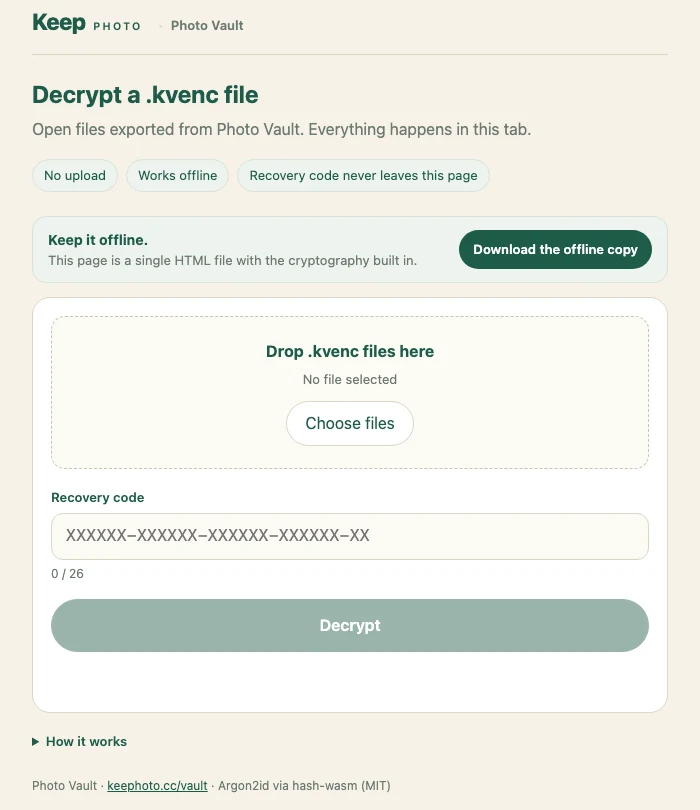
.kvencfile and enter the recovery code. This is the easiest route on a phone. - In the browser decryptor. Open the offline decryptor, drop the file in, type the code, and save the result. Everything runs in the tab: no upload, no account, no network request.
- From a saved copy. The decryptor is a single HTML file, downloadable at
/vault/tools/kvenc-decrypt. Save it next to your exports and it still works with no internet, which is the point. - From the command line.
kvenc-cliis a JVM tool that streams the file instead of loading it into memory. Use it for videos measured in gigabytes, where a browser tab would run out of memory.
- Get the file onto the device you want to open it on. USB, a memory card, or the LAN transfer all work. Keep the original until you have opened the copy.
- Open the decryptor or the app. If you are using the browser tool, save the HTML file first so you are not depending on the site being up.
- Enter the recovery code. 26 characters in 6-6-6-6-2 groups; the dashes are optional. The key derivation takes a few seconds by design.
- Save the decrypted file. It comes back with its original name, type and size, because those were in the encrypted metadata.
The code you need is the one from export time
This trips people up, so it is worth stating plainly: a .kvenc file is wrapped with the recovery code that was in use when the export was made.
- Resetting the PIN does not re-encrypt anything. If you forgot your PIN and restored access with the code, exports made before that still open with the same code.
- Older exports keep their own code. If your code ever changes, files exported before that still open with the code from when they were made. Label them, or keep both codes.
- There is no per-file password. The code is the only secret involved, and it is never stored in the file.
If you no longer have the code that was used, the file cannot be opened — by you, by us, or by a recovery service. That is the same boundary as the vault itself, described in the recovery guide.
Why the format matters for long-term access
A backup is only a backup if you can open it later, on a device you still have, without a company staying in business. The .kvenc format is built for that:
- No account. There is nothing to sign in to and nothing to suspend.
- No server. Decryption is local arithmetic; the file is the whole container.
- No app required. A single HTML page and a command-line tool can both read it, and both can be kept offline.
- A versioned, fixed format. A decryptor written today still reads files made years ago, and the version marker means a future change can't be confused with the current one.
That is also why the desktop copy is worth keeping. Copy the exports and the decryptor HTML onto the same drive, and the pair is self-sufficient. A full encrypted backup covers the whole vault in one archive; .kvenc files are better for individual items you want to move or park somewhere.
Limits worth knowing before you rely on it
- No code, no file. There is no recovery service, and no way to preview what is inside without the code.
- Metadata is encrypted too. You can't sort a folder of exports by name or see thumbnails until each one is opened. For a big archive, that is a real cost.
- An export is not a backup by itself. One file in one place is one copy. Keep a second copy, and test that it opens.
- Large files need the right tool. A browser tab has a memory ceiling; a multi-gigabyte video belongs in the command-line tool.
- Corruption is not silent. If a chunk fails authentication, the file refuses to open. That protects you from a tampered file, and it also means a bad copy cannot be "mostly recovered".
FAQ
Is a .kvenc file a ZIP file or a video?
Neither. It is a single encrypted container with its own header, key derivation settings and payload. Renaming it to .zip or .mp4 will not make it open.
Can I open a .kvenc file without the app?
Yes. Use the browser decryptor at keephoto.cc/vault/decrypt, its downloadable copy, or the command-line tool. All three read the same format and run locally.
What if I lost the recovery code used for that export?
The file cannot be decrypted. The code is the only secret in the container, so there is no second path in — that is the trade for nobody else holding a copy of your key.
Does changing my PIN break old exports?
No. The PIN unlocks the vault; exports are wrapped with the recovery code. Old .kvenc files still open with the code that was current when they were made.
Can I send a .kvenc file to someone else?
You can send the file, but the recipient needs the recovery code to open it, and that code also opens every other export you made with it. If you want to share a photo without sharing your vault code, export the original instead.