Android guide
How to hide videos on Android

Hiding a video is harder than hiding a photo: the file is bigger, the gallery keeps a thumbnail, and backups treat it as media. A gallery toggle can remove the thumbnail and leave the video in the cloud, in a chat, or in an open folder.
The methods overlap with how to hide photos on Android; the video-specific parts are size, thumbnails, playback, and backups.
Where Android keeps videos
Find the clip first; hiding the wrong folder is why a video "reappears".
DCIM/Camera— camera recordings.Movies— screen recordings, edited exports, downloads.Download— files saved from a browser or chat.Android/media/...— app media. WhatsApp usually stores received video underAndroid/media/com.whatsapp/WhatsApp/Media/WhatsApp Video; Telegram uses its own folder there.- An SD card — the same names under the card's root.
Android's gallery indexes shared storage, so hiding one album can leave a clip visible in another picker.
1. Gallery "hide album" toggles
Samsung, Xiaomi, OPPO, vivo and OnePlus galleries let you hide an album; Google Photos uses Archive and Locked Folder instead. The control is usually a long-press or an album menu behind a privacy PIN.
What it does: removes the album from that gallery's list and stops showing its thumbnails.
What it doesn't: it is an index change, not a file permission. Other apps that scan storage still see the videos, thumbnails can surface in a recent strip, and anyone who knows the gesture can unhide the album.
Hiding the album does not hide the file. It is still in shared storage with a readable name, and any app that scans folders can find it. If the folder was already backed up, the video is in your cloud account and the toggle changes nothing there.
2. A .nomedia folder
The no-app method works for video the same way.
- Create a folder such as
Movies/Privatein your file manager. - Add an empty file named exactly
.nomedia. Some file managers refuse a leading dot; use one that allows it, or create the file from a terminal. - Move the videos in. Large files take a while; copy, check, then delete the original.
- Wait for a media scan, or reboot. The folder drops out of the gallery at the next scan.
What it does: the media scanner stops looking inside the folder. New files added there stay hidden too.
What it doesn't: encrypt anything. File managers and video editors still see the files, and an app that scans storage can upload them. A .nomedia folder usually stops Google Photos from offering it as a backup folder, but a video uploaded earlier stays in the cloud.
3. Secure Folder and Private Space
Samsung Secure Folder is a Knox-backed container with its own lock. From Gallery, select the videos and move them in; the folder's gallery shows them, the main one doesn't.
Android 15 Private Space is a separate profile with its own lock. Apps inside keep their data away from the main profile, so a gallery inside can hold the videos; moving existing media in is the awkward part.
Both are device-bound: Secure Folder doesn't move to a non-Samsung phone, Private Space is Android 15+ only, and a reset without a backup takes the contents. Neither gives you a portable file.
4. An encrypted vault, for videos specifically
If the goal is that a copy of the storage yields nothing readable, encryption is the only option on this list. Video adds four requirements a photo vault can get wrong.
File size
A 4 GB video is not a JPEG. A naive implementation reads the whole file into memory and writes a second copy, needing the free space twice and failing halfway. Chunked AES-256-GCM authenticates each piece as it is written, so the video is encrypted without a second full plaintext copy. Ask, and test your largest file.
Thumbnails
A plaintext thumbnail is a readable frame of the video. If thumbnails sit next to the ciphertext as ordinary JPEGs, anyone browsing the folder sees what the video is, even if it won't open. Thumbnails have to be encrypted too.
Playback and seeking
You want to scrub into a two-hour recording without decrypting the whole file. Chunked containers let the player work in pieces instead of rebuilding one temporary plaintext file; a vault that decrypts the whole video to a temp copy doubles storage and leaves a readable file behind.
Export
A video you cannot get out is a hostage. Export should be free, verify what it wrote, and produce a file you can open on a computer without the app. For a 4 GB clip, LAN transfer beats a file manager.
Photo Vault encrypts video this way: AES-256-GCM in chunks, key derived from your PIN with Argon2id, encrypted before it is written to a folder you choose. Thumbnails are encrypted too. Export is free and verifies every file. The free plan allows 5 videos; Pro removes the item limits.
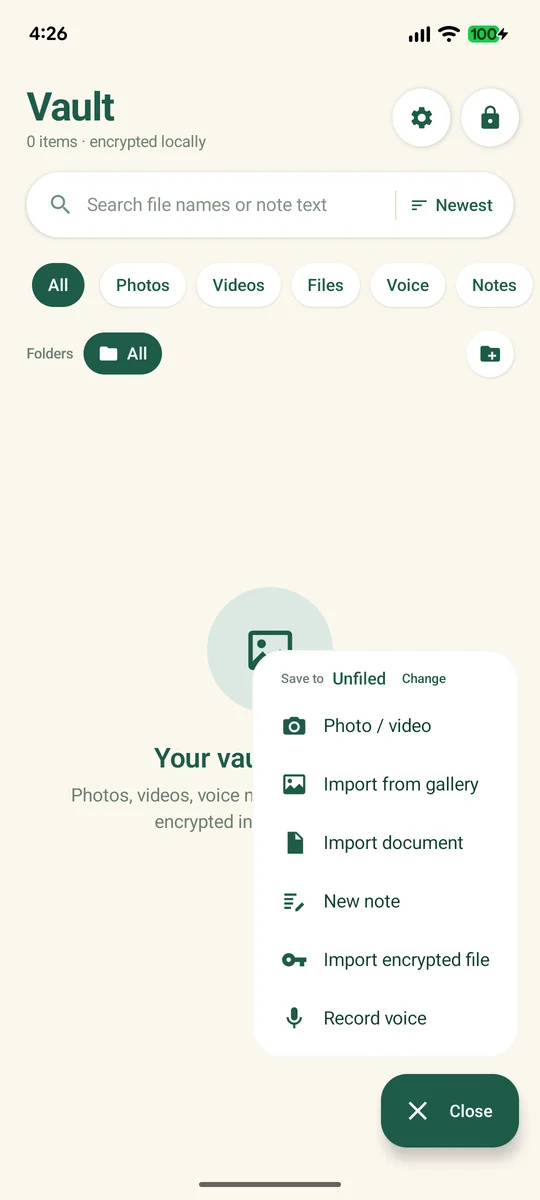
A safe import looks like this:
- Pick the vault folder once. A normal folder you own, not app-private storage.
- Import with Photo / video. The app encrypts while it writes, so no plaintext copy lands in the folder.
- Play it back and scrub to the end; a truncated or badly encrypted video usually fails there.
- Export one clip and open it outside the app, before you delete the original.
5. How to check the hidden video is actually unreadable
- File manager test. Open the vault folder and look for playable
.mp4or.mkvfiles. If a video opens from the file manager, it is hidden, not encrypted. - Copy test. Copy one file to a computer and try it in VLC. Ciphertext fails; a renamed video may still play.
- Airplane mode test. Turn on airplane mode, reboot, and play the video. That proves playback is local, not streamed; the file manager test proves encryption.
- Thumbnail test. Search the folder for ordinary image files. A readable thumbnail is a frame of the video.
- Export test. If you cannot export, you do not have a vault; you have a locked folder.
For the fuller checklist, see is a photo vault app safe; if you are locked out, what recovery can and cannot do is the honest start.
6. What hiding does to backups
Google Photos. It backs up the folders you enabled. Hiding a folder later does not remove videos already uploaded; check Backup → Back up device folders and delete the cloud copy. "Free up space" does the opposite: it deletes the local file and leaves the cloud one.
WhatsApp. Received videos live in WhatsApp's media folder and are linked to the chat. Moving them into a vault makes old messages show a missing file. WhatsApp's Drive backup can include videos if "Include videos" is on, and it is unaffected by the local move.
Hiding does not recall a message. If you sent the video, a copy is on the other phone and possibly in their backup. Deleting for everyone is separate, and cannot guarantee what they saved.
Telegram. Cloud chats keep media on Telegram's servers; clearing the local cache does not delete it. Synced folders copy what you put there: a vault folder inside Drive or OneDrive syncs only ciphertext, so the cloud copy is unreadable without your recovery code.
FAQ
Do hidden videos still take up storage?
Yes. Hiding changes what the gallery indexes, not what is on disk. It keeps its full size until you delete the original.
Can I hide videos on Android without an app?
Yes. Put them in a folder with a .nomedia file, or use your gallery's hide-album toggle. Both hide the video from the gallery; neither encrypts it.
Will hiding a video remove it from WhatsApp?
No. The chat still references its own copy, and the other person has theirs. Moving the file out breaks playback without removing anything from the conversation.
Can a vault play a 4 GB video?
Chunked encryption is built for files that size, but test it yourself: import your largest clip, scrub to the middle and the end, then export it. Do that before deleting the original. The free plan allows 5 videos; Pro removes the item limits.