Android guide
Do photo vault apps delete photos on uninstall?

The short answer: it depends on where the app put your files, and that was decided before you installed it. Two vault apps can look identical and behave in opposite ways when you tap uninstall.
The difference is not encryption, price, or how the icon looks. It is one storage decision.
The one architectural difference
| Where the files live | After uninstall | After "clear storage" | Visible in a file manager |
|---|---|---|---|
App-private storage/Android/data/<package>/ | Deleted by Android | Deleted | Restricted on Android 11 and later |
| A folder you chose e.g. Documents/PhotoVault | Stays | Stays | Yes, the files are yours |
App-private storage belongs to the app. Android removes it when the app is uninstalled, and the "Clear storage" button removes it too. That is a sensible default for app data and a bad place for the only copy of your photos. If a vault app never asked you to pick a folder, this is almost certainly where your files are.
A folder you choose belongs to you. The app reads and writes it, but it is not part of the app's installation, so uninstalling the app does not touch it. The same is true of clearing the app's data: the app forgets where the folder is, and the folder keeps its files.
What Photo Vault does
Photo Vault asks you to pick a folder during setup, for example Documents/PhotoVault. Photos, videos, files and notes are encrypted into that folder as they are imported. The setup screen says it plainly: the app is just the key, and the folder stays if you uninstall it.
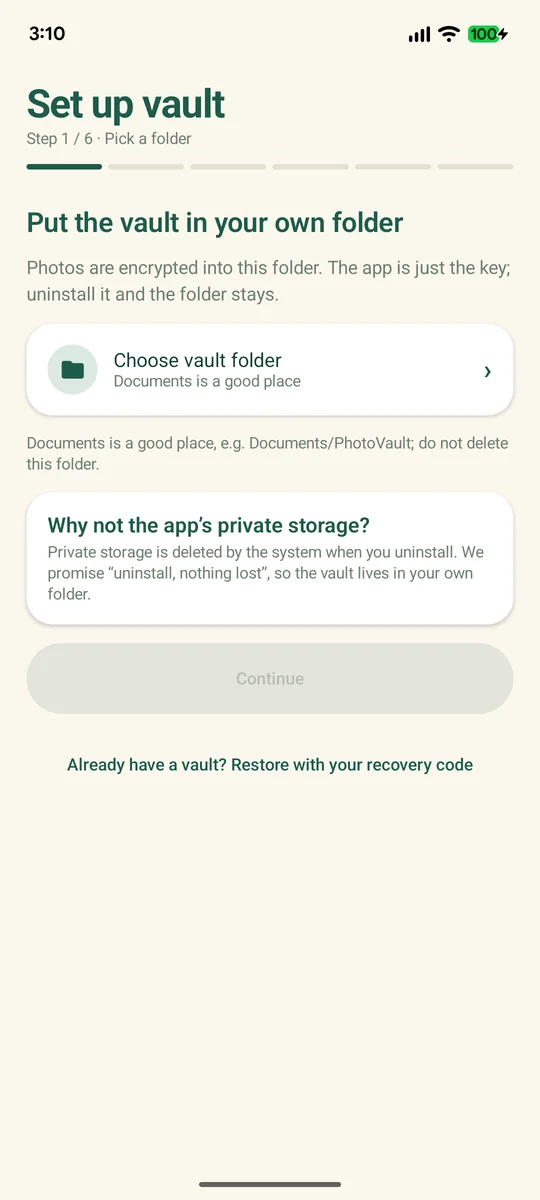
Uninstalling removes the app, its settings, and its memory of which folder you chose. The encrypted files are untouched. Only ciphertext was ever in the folder, so nothing readable is left behind for the next owner of the phone either.
That is the entire claim: uninstalling the app does not delete the vault. Deleting the folder does.
How to tell before you uninstall
Do this before tapping anything.
- Look at the path in a file manager. If the app's files sit under
/Android/data/<package>/, they are app-private and go with the uninstall. If there is a folder inDocuments,Picturesor on an SD card that the app writes to, that folder is yours. - Remember the setup screen. A folder picker at first run is the signal. An app that starts with a PIN screen and no folder choice is keeping the files in its own storage.
- Read the app's own documentation. Look for a specific sentence about uninstall. "Your files stay in the folder you chose" is a testable claim. "Your privacy is our priority" is not a claim about storage at all.
- Run a test file. Create a small text file at the top level of the folder the app uses, uninstall, reinstall, and point the app back at that folder. If the vault opens and the test file is still there, the folder survived and the app can reconnect to it.
On Android 11 and later, most file managers cannot browse /Android/data without extra permissions or a workaround. If you cannot see the app's folder at all, that is a hint that the app is using private storage — and a reason to export before uninstalling, not after.
What happens when you reinstall
Reinstalling is not a restore by itself. The new install is a new app with no memory of the old vault. You have to reconnect the two:
- Install the app.
- Choose the restore path. On Photo Vault's setup screen: Already have a vault? Restore with your recovery code.
- Point it at the vault folder. The one containing
vault.kvh. - Enter the 26-character recovery code. The old PIN is not the restore key.
- Set a new PIN. It can be the same digits or different.
Nothing is decrypted by the reinstall. The installer copies the app; it does not hold your key and cannot read the folder. The files were ciphertext before the uninstall and they are ciphertext after the reinstall, until the code opens them. If the folder was deleted in the meantime, or the code is lost, the reinstall has nothing to work with. That is covered in vault recovery.
What actually deletes the data
- Deleting the vault folder. This is the real delete button. Files removed here are gone, and the recovery code does not bring them back.
- Clearing app data for an app-private vault. Android wipes the app's storage, and the encrypted files are inside it.
- Uninstalling an app that keeps its vault in app-private storage. The system removes the app's data directory with the app.
- A factory reset. Internal storage is wiped, including a vault folder stored on it. A copy you made off the device is unaffected.
- Losing the recovery code. The files survive, but nobody can open them. Effectively, the photos are gone.
- Uninstalling Photo Vault. The app goes; the folder you chose stays.
- Clearing Photo Vault's app data. The app forgets the folder path; the encrypted files stay in the folder.
An app that advertises "uninstall-safe" storage is describing where its files live. The only way to check is to find the folder and watch what happens to it, which is what the test above does.
Uninstall is not the dangerous button. Deleting the folder is. Before you uninstall, copy the folder or take a full backup. After you uninstall, the folder is all you have — and the recovery code is the only thing that opens it.
Before you uninstall: the checklist
- You know the exact folder path, and it is not under
/Android/data. - The whole folder is copied somewhere else, or a full encrypted backup exists.
- One copied item opens on the other device, so the copy is verified rather than assumed.
- The 26-character recovery code is written down outside the phone.
- The app still opens, so you can take one last export if anything looks wrong.
- If the phone is being sold, you will delete the folder after the copy is verified — the next owner should not receive your ciphertext either.
The order matters. Export, verify, then uninstall. Reinstalling to fix a mistake only works if the folder and the code are both still around, and moving a vault to a new phone is the same job done deliberately. The export formats and the restore test are covered in how to back up a photo vault.
FAQ
Does uninstalling Photo Vault delete my photos?
No. The vault is a folder you chose, not app-private storage, so the encrypted files stay in that folder after the app is removed. Deleting the folder is what deletes them.
Does clearing app data delete the vault?
For Photo Vault, no. The vault lives in your folder, and clearing the app's data removes its settings and its record of the folder path. For an app that keeps the vault in app-private storage, clearing app data deletes the encrypted files with everything else.
Why did my old vault app lose everything when I uninstalled it?
Because that app stored the vault in app-private storage. Android deletes that directory on uninstall, and many vault apps never warn you. If you still have the phone and the app can be reinstalled, check whether a folder in <code>Documents</code> or on the SD card holds the files before you give up.
Can I get my photos back after reinstalling?
Only if two things survived: the vault folder and the recovery code. Point the app at the folder, enter the code, set a new PIN. Without the folder there is nothing to open; without the code there is no way to open it.
Does uninstalling delete my recovery code?
The code is shown once, at setup, and the app does not display it again on demand. Uninstalling changes nothing about the code itself, but it will not reveal it either. If you never wrote it down, a reinstall will not recover it, and the files stay locked.